
SQL Query Builder: Build Safe Queries Without Code
A SQL query builder can remove syntax work, but it cannot replace data context or verification. Use this practical workflow to build no-code queries, catch bad joins, enforce read-only access, and choose the right builder for your team.
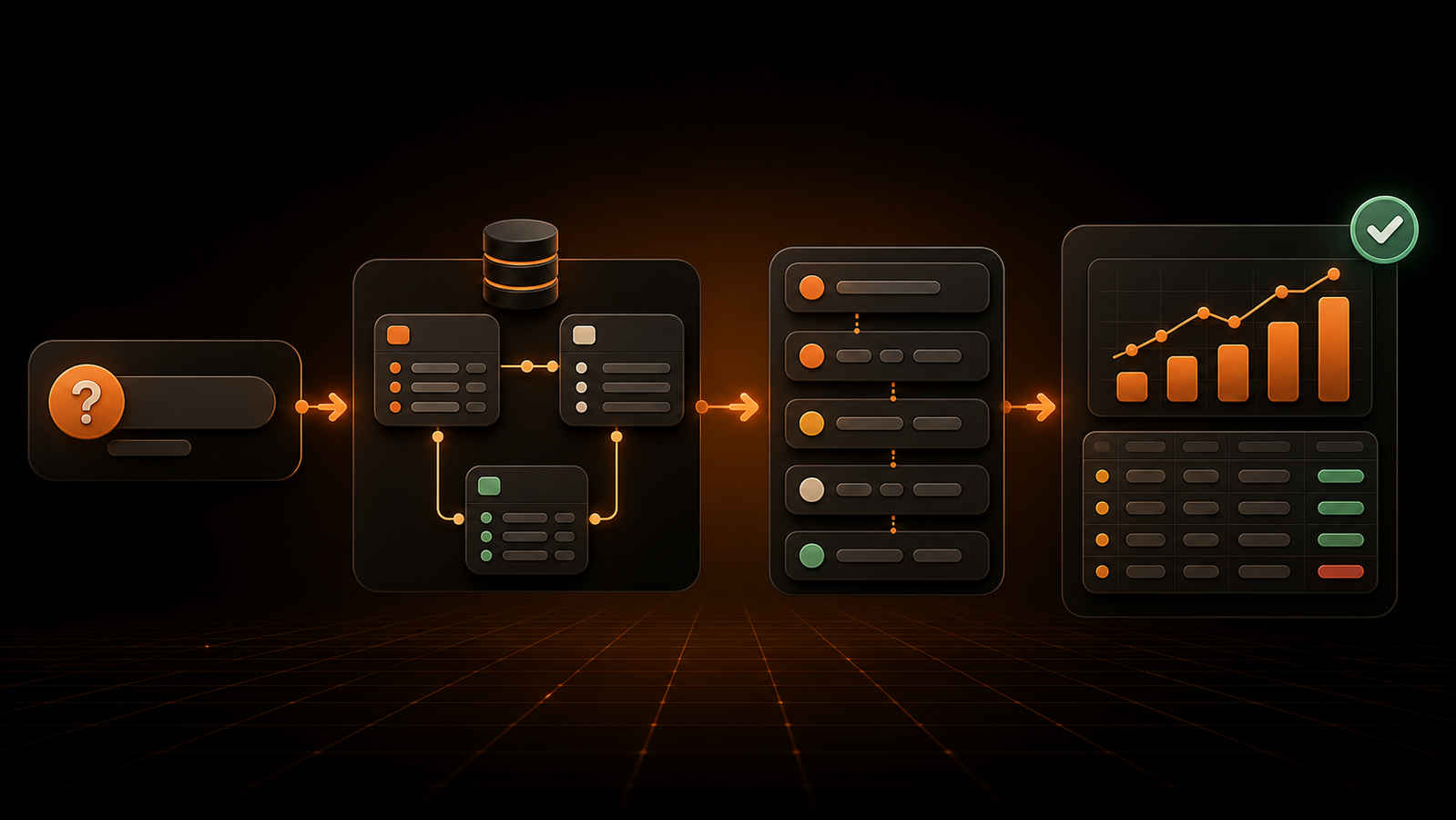
You know the business question. The obstacle is translating it into the right tables, joins, filters, and aggregations without waiting in an analyst queue—or accidentally returning a convincing but wrong number. A SQL query builder closes that gap by turning structured choices or plain-English instructions into SQL you can inspect and run.
The useful question is not whether a builder can produce valid syntax. Most can. It is whether the tool helps you preserve the meaning of the question, control access, verify the generated query, and recognize when the analysis has outgrown a no-code interface. This guide shows how to do that.
What is a SQL query builder?
A SQL query builder is a visual interface, programming library, or AI-assisted tool that constructs SQL from higher-level inputs. Instead of typing every clause, a user selects tables, columns, joins, filters, groups, and sort rules—or describes the desired result—and the builder generates the corresponding query.
Visual builders commonly present database tables on a canvas and update the SQL as the user connects them. For example, DBeaver's Visual Query Builder documentation describes a canvas, a palette, and query settings for columns, conditions, joins, and sorting, with a switch between the visual representation and generated SQL.
The builder removes some syntax work, not the need to understand the data. A query can run successfully and still double-count orders, omit customers, use the wrong date, or expose data a user should not see. The best workflow therefore keeps the generated SQL, schema relationships, sample rows, and final result visible enough to verify.
Three types of SQL query builders
The phrase “SQL query builder” covers products built for different jobs. Choose the category before comparing features.
| Type | Input | Best for | Main limitation |
|---|---|---|---|
| Visual query builder | Tables, fields, joins, filters, and controls | Analysts and business users exploring a known schema | Complex logic can become awkward or unavailable |
| Programmatic query builder | Methods or typed expressions in application code | Developers composing dynamic queries safely and consistently | Still requires programming and database knowledge |
| AI SQL generator | A plain-English question plus schema context | Fast ad hoc analysis and a lower learning curve | Ambiguous language can produce plausible but unintended logic |
A visual builder is the closest match for someone who wants to build SQL without coding. The user might drag customers and orders onto a canvas, connect their key columns, choose a revenue measure, add a date filter, and preview the result.
A programmatic builder solves a different problem. A developer assembles a query through a library API rather than concatenating raw strings. That can make conditional filters and reusable query fragments easier to maintain, but it does not turn database work into a no-code task.
An AI builder starts from intent rather than interface controls. It can be faster when the question is clear—“Show monthly net revenue by plan for the last 12 months”—but the user still needs a way to review the interpretation, generated SQL, source fields, and result. In practice, the strongest tools combine modes instead of forcing everyone into one.
How an SQL query builder works
Imagine an operations manager wants to answer: “Which customers placed at least three completed orders this quarter, and what did they spend?” A builder typically converts that question through the following stages.
1. Read the available schema
The tool first needs database metadata: schemas, tables, columns, data types, keys, and sometimes documented relationships. This is why a connected builder can be safer than pasting a prompt into a generic text box. The connected tool can restrict choices to objects that actually exist.
Schema awareness does not guarantee business meaning. A field called amount might represent gross order value, net revenue, tax-inclusive value, or a value in minor currency units. Descriptions, governed metrics, and human context remain essential.
2. Select the source and grain
The user chooses a starting table—perhaps orders—and decides what one output row should represent. In this example, the desired grain is one row per customer. Stating the grain before adding fields prevents a common failure: mixing customer-level and order-line-level data, then inflating counts or sums.
3. Build joins and conditions
The builder connects orders.customer_id to customers.id, filters to completed orders inside the quarter, groups by customer, and applies a condition to retain customers with at least three orders. Visual tools often infer joins from declared foreign keys. Treat that inference as a proposal, especially when a schema has multiple possible paths or weak constraints.
4. Generate a database-specific statement
The structured choices become SQL. The exact syntax varies by database, but the logical result may resemble:
SELECT
  c.id AS customer_id,
  c.name AS customer_name,
  COUNT(DISTINCT o.id) AS completed_orders,
  SUM(o.net_amount) AS net_revenue
FROM customers AS c
JOIN orders AS o
  ON o.customer_id = c.id
WHERE o.status = 'completed'
  AND o.completed_at >= :quarter_start
  AND o.completed_at < :next_quarter_start
GROUP BY c.id, c.name
HAVING COUNT(DISTINCT o.id) >= 3
ORDER BY net_revenue DESC
LIMIT 100;
This example uses named parameters for the dates instead of inserting input directly into the SQL string. The OWASP SQL Injection Prevention Cheat Sheet recommends prepared statements with parameterized queries as a primary defense because the database can distinguish code from data.
5. Execute, display, and save the result
The builder runs the query using the connected database credentials, then presents rows, a chart, or both. A mature tool also retains query history, execution status, ownership, and enough context for another person to reproduce the answer.
Where query builders help—and where they do not
An SQL queries builder is most valuable when it shortens a repeatable path from question to trustworthy answer. It is less valuable when its abstraction hides the details that determine correctness.
Tasks that fit well
- Selecting a known set of dimensions and measures
- Filtering records by dates, categories, owners, or status
- Joining a few tables through well-defined keys
- Grouping results and applying standard aggregates such as
COUNT,SUM,MIN,MAX, orAVG - Sorting results and adding a sensible
LIMITstatement during exploration - Creating reusable questions, charts, or dashboard inputs
- Teaching newer users how visual choices map to SQL clauses
Microsoft's Fabric visual query tutorial demonstrates this familiar pattern: add warehouse tables to a visual canvas, select fields, merge data, transform it, and inspect results. Metabase's query-builder documentation similarly separates graphical questions from native queries while allowing saved questions to become building blocks for further analysis.
Tasks that often need SQL or specialist review
- Several nested subqueries or multi-stage transformations
- Recursive logic and advanced common table expressions
- Window functions with subtle partitions and frames
- Vendor-specific functions or optimizer hints
- Large many-to-many joins where duplication risk is high
- Performance tuning on high-volume or high-concurrency workloads
- Data modification, administration, or migration
- Metrics whose definitions depend on complex business rules
This boundary is not a failure. PostgreSQL describes a WITH query, or CTE, as an auxiliary statement that can break a complex query into simpler parts; recursive CTEs can even refer to their own output. The current PostgreSQL CTE documentation shows why multi-stage and recursive work may be clearer in a native editor than on a crowded visual canvas.
How to build a safe SQL query without code
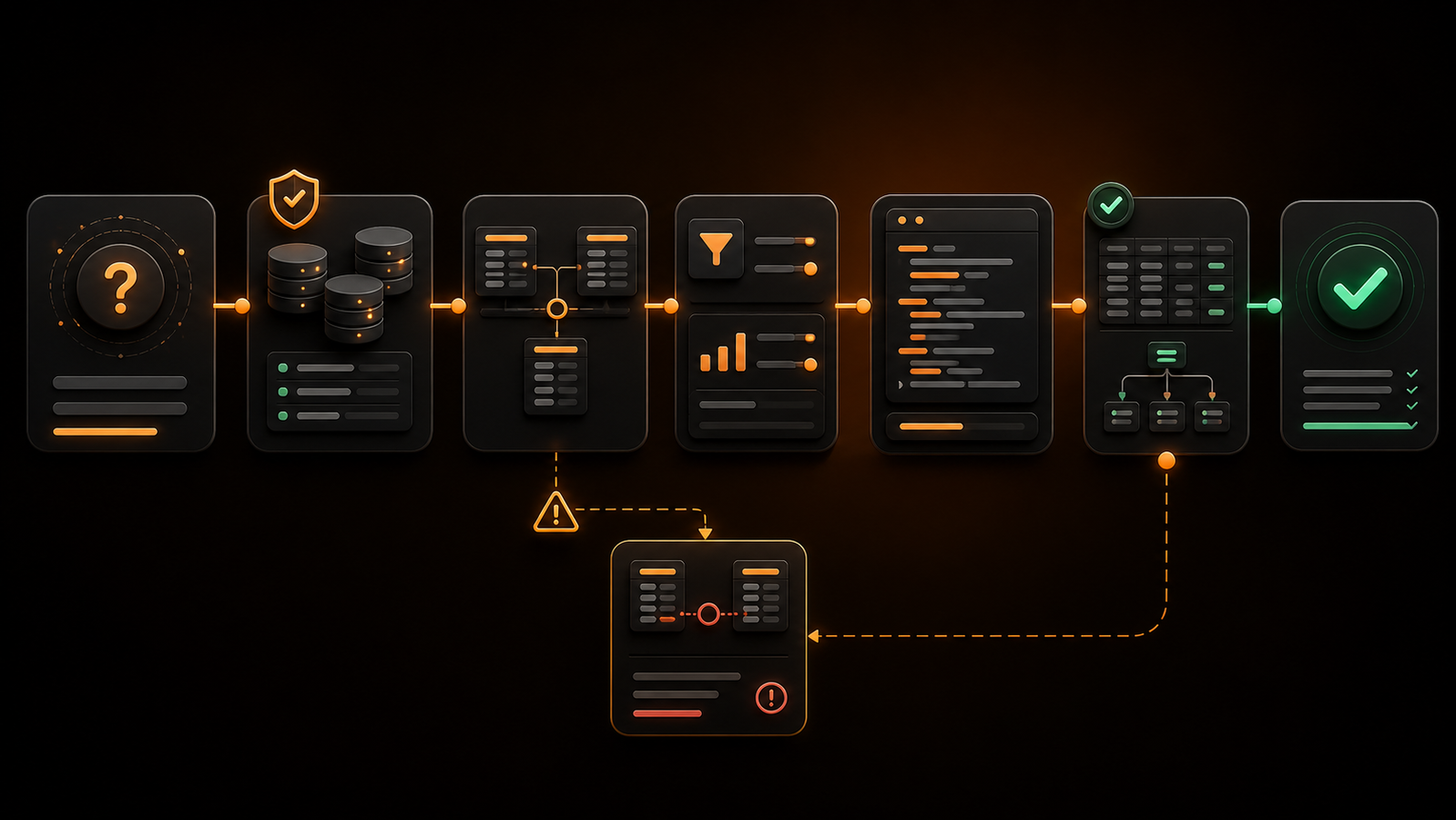
A safe workflow treats query generation as a draft followed by checks. Use these steps whether the interface is drag-and-drop or driven by natural language.
Step 1: Write the expected output first
Describe one result row in plain language: “one row per customer,” “one row per product per week,” or “one row per account.” Then list the measures, filters, and comparison period. If you cannot state the grain, the builder cannot rescue the analysis from ambiguity.
Also write one or two expectations you can test. For example: a known customer should appear, canceled orders should not, and total revenue should roughly reconcile to an approved report for the same period.
Step 2: Start from governed tables or views
Prefer a documented analytics view, semantic model, or certified dataset over raw operational tables when one exists. Governed sources can encode approved joins, time zones, status rules, and metric definitions that would otherwise be rebuilt differently by every user.
If raw tables are necessary, inspect column descriptions and a small sample before building aggregations. Similar field names are not interchangeable, and timestamps often differ in meaning.
Step 3: Add the minimum columns and joins
Select only the fields needed for the answer. Every extra table introduces another join path, access consideration, and opportunity to multiply rows.
Review each join deliberately:
- Which columns connect the tables?
- Is the relationship one-to-one, one-to-many, or many-to-many?
- Should unmatched rows remain through a left join, or is an inner join correct?
- Can either key be null or duplicated?
- Does the join need an additional condition such as tenant, version, or effective date?
Preview row counts before and after every important join. If 10,000 orders become 18,000 rows after adding payments, that may be expected—or it may mean that multiple payment attempts are duplicating order value.
Step 4: Apply filters before trusting aggregates
Use explicit time boundaries, statuses, and inclusion rules. Half-open date ranges—greater than or equal to the start and less than the next period's start—usually avoid time-of-day gaps at the end of a period.
Keep filter values parameterized when the product supports it. Parameters protect the boundary between SQL structure and user-supplied values. They do not replace authorization, allow-list validation for identifiers, or least-privilege database access.
Step 5: Group, sort, and limit intentionally
Match every selected dimension to the intended grain, then add aggregates. Use HAVING for conditions on grouped results and WHERE for conditions on input rows.
During exploration, add a row limit so a mistaken query does not immediately return a huge result. Be careful when interpreting a limited result: PostgreSQL's documentation for `LIMIT` and `OFFSET` warns that a predictable subset requires an ORDER BY that constrains row order. A top-100 list without a defined sort is not a meaningful top-100 list.
Step 6: Inspect the generated SQL
Even if you do not write SQL from scratch, learn to recognize SELECT, FROM, JOIN, WHERE, GROUP BY, HAVING, ORDER BY, and LIMIT. Confirm that the generated statement uses the intended tables and join keys, qualifies ambiguous fields, keeps filters in the right place, and does not contain write operations.
For recurring business questions, GetInsights can take a plain-English question, generate and run SQL against a direct database connection, and turn the result into charts or dashboards. Its enforced read-only layer is designed to block INSERT, UPDATE, DELETE, DROP, and TRUNCATE, making it a fit for self-service analysis rather than database administration.
Step 7: Validate the answer, not just the syntax
Run the query on a narrow period or known entity. Compare totals with an approved source, inspect raw rows behind an aggregate, test a missing-value case, and look for duplicates. Ask a domain owner to review the logic when the metric affects a consequential decision.
For expensive queries, inspect the execution plan before scaling up. PostgreSQL's guide to `EXPLAIN` explains that a query plan is a tree of scans, joins, sorts, and other nodes, with estimates for work and returned rows. A builder that exposes plans, estimates, timeouts, or scanned-data warnings gives analysts a better chance to catch a costly query before it becomes a recurring dashboard problem.
Step 8: Save the definition with context
Give the query a purpose-based name, record its owner and metric definition, and note important assumptions. Save a chart only after saving the underlying question. When a field or business rule changes, the team should be able to find affected queries instead of reverse-engineering unexplained exports.
How to choose an SQL query builder
Evaluate tools with representative questions and realistic permissions—not a vendor's prepared demo. This checklist separates useful abstractions from decorative ones.
Schema and SQL transparency
The builder should show available tables and fields, surface relationships, display generated SQL, and make it easy to move between visual and native modes. Check whether it preserves manual edits or overwrites them when returning to the visual canvas.
Database and dialect support
Confirm support for your exact databases and versions, including quoting rules, date functions, JSON fields, arrays, case sensitivity, and vendor-specific syntax. “Supports SQL” is too broad when PostgreSQL, MySQL, BigQuery, Snowflake, Redshift, and SQL Server can express the same task differently.
Join and aggregation controls
Test inner and outer joins, multiple conditions, aliases, calculated fields, grouped filters, distinct counts, null handling, and date bucketing. Then test a CTE or window function to discover the product's real complexity ceiling.
Natural-language behavior
If the product uses AI, ask ambiguous questions on purpose. Does “best customers” mean revenue, margin, order count, retention, or lifetime value? A trustworthy system requests clarification or shows its assumption. Also verify whether users can inspect the generated SQL and the fields behind the answer.
Validation and performance safeguards
Look for result previews, row estimates, timeouts, scanned-data warnings, query cancellation, execution plans, cached results, and query history. A SQL minifier or beautifier can change presentation, but it does not verify logic or improve a plan by itself; preserve a readable version for review. For formatting workflows, see this guide to SQL beautifier tools.
Sharing and lifecycle management
Check version history, ownership, comments, certified questions, dashboard reuse, schedules, alerts, and the effect of schema changes. Useful SQL should become a maintained analytical asset rather than another private snippet.
Security requirements for a SQL query builder
A builder sits close to valuable data, so interface simplicity must not weaken database controls.
Enforce read-only access at the database boundary
Do not rely only on a disabled button or a prompt telling an AI not to write data. Connect analytical users through a database role that lacks write privileges. PostgreSQL, for example, treats SELECT, INSERT, UPDATE, and DELETE as distinct privileges in its GRANT documentation.
Read-only access limits damage, but it does not make all data appropriate for all readers. Add row-level, column-level, or governed-view controls so each user can access only approved customers, regions, tenants, or sensitive fields.
Parameterize values and validate identifiers
Prepared statements should bind values rather than concatenate them into query strings. Table names, column names, and sort directions usually cannot be handled as ordinary bind values, so map those choices to an allow-list of known identifiers. OWASP also recommends least privilege as an additional defense, reducing what a successfully exploited account can reach.
Control workload as well as access
A read-only query can still scan an entire warehouse, create heavy joins, or compete with production traffic. Use timeouts, row and byte limits, concurrency controls, replicas or workload isolation where appropriate, and cost visibility for consumption-priced warehouses.
Keep an audit trail
Record who ran which query, against which connection, at what time, and whether it succeeded. For AI-generated SQL, retain the original question and interpretation alongside the statement. Avoid storing sensitive result values in logs when the audit requirement can be met with metadata.
Review how schema context is handled
An AI builder may need table names, column names, descriptions, or sample values to produce a useful query. Ask exactly what leaves your environment, which model or service receives it, how long it is retained, whether it is used for training, and how deletion and regional processing work. “We do not send your data” is not enough if schema metadata itself is sensitive.
When raw SQL is the better choice
Choose raw SQL when the native statement is clearer than the builder's representation. That often happens with layered CTEs, window functions, recursive relationships, complex set operations, reusable transformations, and careful performance work.
Raw SQL is also preferable when a query belongs in version control, needs automated tests, or will become part of a production data model. A builder can still help sketch the first version, visualize a join, or let a reviewer inspect the logic.
This is not an all-or-nothing decision. Teams often use a visual or AI query builder for exploration, save governed questions for common analysis, and move stable or complex logic into reviewed SQL models. The useful dividing line is not technical versus non-technical users; it is whether the abstraction makes the logic easier or harder to verify.
Frequently asked questions
Can I build SQL queries without coding?
Yes. A visual SQL query builder lets you select tables, connect joins, add filters, group results, and generate SQL through a graphical interface. An AI-assisted builder can also translate a plain-English question into SQL, but you should still review the interpretation and validate the result.
What is the difference between a visual query builder and an AI SQL generator?
A visual builder uses explicit controls such as table cards, join lines, field selectors, and filter forms. An AI SQL generator begins with natural language and infers those choices from the schema and prompt. Visual tools provide more direct control; AI tools can be faster for clear questions but need stronger clarification and review behavior.
Does a query builder prevent SQL injection?
Not automatically. A programmatic builder or connected application should use parameterized queries for values, allow-list validation for identifiers, and least-privilege database credentials. A visual interface alone is not a security boundary.
Can a SQL query builder delete data?
Some builders and database clients support INSERT, UPDATE, or DELETE, while analytics-focused products may generate only SELECT queries. The dependable safeguard is a database connection whose role has no write privileges, combined with product-level restrictions and audit logging.
What is the difference between an ORM and a query builder?
An object-relational mapper represents database records through application objects and usually handles persistence as well as querying. A query builder focuses on constructing database queries while keeping the developer closer to SQL concepts. Many ORMs include a query-building API, so the categories can overlap.
Should I learn SQL if I use a query builder?
Learn enough SQL to inspect the generated statement and reason about joins, filters, grouping, nulls, and row limits. You do not need to memorize every function to benefit from a builder, but basic literacy makes it much easier to catch a logically wrong answer.
Choose for verification, not just generation
The right SQL query builder makes common questions faster while leaving the logic visible. Shortlist the category that fits your users, then test each product with one real question, realistic permissions, an ambiguous prompt, a many-to-many join, a known result, and a deliberately expensive query.
Choose the tool that helps your team explain why the answer is correct—not merely the one that produces SQL in the fewest clicks. Start with a read-only connection and one governed dataset, document the expected result, and expand access only after the workflow passes correctness, security, and performance checks.
Ask your data a question instead
Connect your database and ask in plain English. GetInsights writes the SQL, runs it read-only, and hands you the chart and dashboard.
Start for free